

The office has no walls anymore. Whether someone is working from your HQ or a home office halfway across the world, sensitive data is constantly moving between people, devices, and systems.
I've noticed companies sometimes treat independent contractors more casually because they're external. But I think that creates an artificial divide, whether intentional or not. If someone has access to your customer data, intellectual property, or internal systems, they should meet the same professional security standards as anyone else on your team.
Good remote work security shouldn't make people harder to work with. It should be the invisible infrastructure that allows them to work safely.
And most security problems aren't particularly sophisticated. They come from unclear systems, weak onboarding, poor documentation, and complacency. Get those foundations right, and you remove a lot of unnecessary risk without getting in the way of good work.
What Is Remote Contractor Security?
Remote contractor security is the combination of policies, processes, and technology used to protect company systems and data when working with independent contractors.
The principle I come back to is mirroring. If a contractor and an employee have access to the same sensitive information, the security standards should generally be the same. Access and risk matter more than contract type.
That means verifying who someone is, giving them access only to what they need, protecting the devices and accounts they use, and removing that access when the work ends.
Security and compliance are related, but they're not the same thing. Security should follow risk and access, while contractor compliance also depends on how someone works, where they’re based, and the legal nature of the relationship.
Common Security Risks When Hiring Remote Contractors
The biggest security risks with remote contractors aren't unique to contractors. They're the same problems that affect any distributed team, but they can be easier to overlook when someone sits outside your usual HR and IT processes.
Identity Fraud, Phishing, and Credential Theft
Identity is the first line of defense. Before someone enters your systems, you need to know that the person doing the work is the person you vetted and hired.
That's becoming harder to take for granted. The FBI reported that losses from internet crime reached $16.6 billion in 2024, up 33% from the previous year. It has also warned employers about schemes involving fraudulent remote workers using stolen identities and AI-generated or altered information during the hiring process.

Once someone is inside, credentials become the next target. Phishing, weak passwords, and social engineering can turn a legitimate account into an easy way into company systems.
Excessive Permissions and Poor Offboarding
Remote contractors should have the same access to tools and information as an employee doing the same job. The important thing isn't restricting access because someone is a contractor. It's making sure that access is appropriate, controlled, and easy to remove when it's no longer needed. In fact,
I've found problems tend to arise when access isn't actively managed. Permissions accumulate over time, roles change, and old accounts stay open after projects finish.
That's where least privilege comes in. It doesn't mean giving contractors less access. It means giving everyone the access their role requires, reviewing it as responsibilities change, and removing it promptly when the relationship ends.
Personal Devices and Insecure Remote Access
Remote contractors may work from personal laptops, home networks, coworking spaces, or while travelling. That flexibility is useful, but it means you can't assume every device and connection meets your security standards.
IBM's Cost of a Data Breach Report 2026 found that breaches involving remote work as a factor cost organizations an average of nearly $1 million more than breaches where remote work wasn't a factor.

That doesn't mean personal devices or remote work are inherently unsafe. It means companies need clear standards around operating-system updates, encryption, endpoint protection, device access, and how contractors connect to sensitive company systems.
Shadow IT, AI Tools, and Poor Data Handling
One of the newer risks is also one of the easiest to underestimate: people using helpful tools that the business doesn't know about.
A contractor might upload a file to an unapproved storage service, download customer information to a personal device, or paste proprietary information into a public AI tool because it helps them complete a task faster.
IBM's 2025 research found that 63% of organizations lacked AI governance policies, while 97% of organizations reporting an AI-related security incident lacked proper AI access controls.
That's why good contractor security starts with clear rules. Define what people can access, where data can go, which tools they can use, and what they should do when something goes wrong.
Remote Contractor Security Best Practices
If your team views security as a series of bureaucratic hurdles, they will find shortcuts. This is a human tendency across any organization. To prevent it, you must align every partner with the intent behind the rules before handing over the keys. Therefore, security should be your organizational standard, adapted for the role.
1. Start With a Clear Security Standard
Give your team a simple “Security North Star” they can use to guide decisions. It might be: “We protect customer data because their trust is fundamental to our business.”
Then put that principle into practice with an Acceptable Use Policy (AUP). Keep it practical and cover the things people actually need to make decisions about:
- Data and AI: What information can be shared, stored, or entered into external AI tools.
- Approved tools: Which applications people can use for company work.
- Devices: Minimum standards for updates, encryption, and endpoint protection.
- Remote access: How people should connect to company systems securely.
- Incident reporting: What to do, and who to tell, when something goes wrong.
The less ambiguous it is, the better.
2. Make Security Part of Contractor Onboarding
Security should be in place before the first login. Start by verifying who you're hiring, documenting what's expected, and making sure the right controls are in place before access is granted.
A simple process should include:
- Verify identity: Confirm the person you're hiring is the person doing the work, with appropriate vetting and background checks.
- Document responsibilities: Put confidentiality, IP, data handling, and security requirements in writing.
- Set up access: Create individual accounts and give people the tools and permissions their role requires.
- Check devices and connections: Confirm they meet your standards for device security and remote access.
- Explain incident reporting: Make sure people know exactly what to do if something goes wrong.
At Work for Impact, we take identity verification further than a scanned ID. Our KYC process uses biometric checks, including motion-based liveness detection and anti-spoofing measures, alongside state and federal police checks and reference checks. For companies hiring across borders, that provides a verified foundation before a contractor enters their systems. Optional Zero Trust security networks can add another layer of protection where the role involves more sensitive access.

For companies hiring across borders, this removes a lot of the groundwork involved in establishing who you're working with before they enter your systems. From there, you can apply your own access controls based on the role and the sensitivity of the data involved.
3. Use Zero Trust and Least Privilege Access
For roles involving financial records, core codebases, or personally identifiable information (PII), a password shouldn't be the final proof of identity. This is where Zero Trust becomes useful: never assume access is safe simply because the credentials are correct.
Depending on the sensitivity of the role, that can include:
- Device health checks: Confirm the device is updated, encrypted, and meets your security standards before allowing access.
- Contextual access: Flag unusual locations, devices, or other login behavior for additional verification.
- Protected resources: For high-risk systems, Zero Trust Network Access (ZTNA) can limit access to specific resources rather than exposing the wider network.
Pair this with least privilege access. This doesn't mean giving contractors less access than employees. It means giving everyone the access they need to do their job, and no unnecessary access beyond it.
As responsibilities change, permissions should change with them. Role-based access and regular reviews help prevent access from quietly accumulating over time.
4. Centralize Identity With IAM, SSO, and MFA
As remote teams grow, managing individual accounts becomes messy. Professional organizations manage identities, not just passwords. The aim is to give people the access they need while keeping that access centralized and easy to control.
|
Control |
Purpose |
|
Identity and Access Management (IAM) |
Controls identities, roles, and permissions centrally |
|
Single Sign-On (SSO) |
Gives each person one corporate identity and a central kill switch |
|
Multifactor Authentication (MFA) |
Adds another layer of protection beyond passwords |
|
Password manager |
Lets you share access, not secrets |
|
Passkeys / security keys |
Adds phishing-resistant protection for sensitive access |
When someone leaves, you can disable their corporate identity, revoke vault access, and close the remaining doors without hunting through every tool they've used.
5. Secure Devices and Remote Connections
You can't control the network your team uses, whether it's a home router or a coworking space, but you can control the conditions under which they access your systems.
Set a clear baseline:
- Device security: Require current operating systems, regular updates, encryption, and endpoint protection.
- Device management: For sensitive roles, use device management to enforce security standards rather than relying on individuals to maintain them.
- VPNs: Use encrypted connections when contractors need secure access to company networks.
- Zero Trust Network Access (ZTNA): For higher-risk systems, limit access to specific resources rather than exposing the wider network.
- Risk-based controls: Apply stronger requirements to people working with financial records, production systems, customer PII, or other sensitive data.
The principle is simple: the more sensitive the access, the stronger the controls around the device and connection.

The same principle applies to the platforms you use to manage a distributed workforce. At Work for Impact, our own security framework is ISO 27001 and SOC 2 certified and aligned with the NIST Cybersecurity Framework. That matters because contractor security isn't only about the individual. The systems sitting between your company and your global team need to be secure too.
How to Build a Security Culture Across a Remote Workforce
Technology is only one part of remote workforce security. The way people respond to threats matters just as much The most sophisticated technical stack can be bypassed by a single human error. Don’t approach security as a "set and forget" task.
Continuous Training
Information decays. Do not expect anyone to remember a long onboarding video from six months ago.

Integrate quarterly micro-trainings into the workflow. Keep them under five minutes. These quick updates should focus on current threats like AI-generated voice scams or new phishing tactics. This keeps security top of mind without requiring hours invested in the process.
Phishing Simulations
You do not know if your training works until it is tested in a real-world scenario.
Use tools like KnowBe4 to run regular phishing simulations. Send fake malicious emails to everyone, including your contractors. The goal is to test if they click on suspicious links or provide credentials in a controlled environment.
If they fail the test, do not punish them. Use it as a teachable moment. Immediate, automated retraining is much more effective than a lecture a week later.
Reporting Culture
Treat mistakes as something that can happen. The biggest risk to your data is the time it takes for you to find out about it. In a remote environment, people are often afraid to admit they messed up.
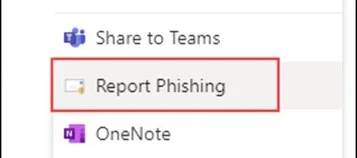
Encourage an environment where reporting a "bad click" is seen as a responsible action. The faster you know a device might be compromised, the faster you can act to protect your assets. Speed of reporting is critical to containment.
Secure Remote Teams Are Built on Good Systems
For me, the fundamentals come down to three things: verify who you're working with, put sensible controls around their access, and build a culture where people understand their responsibility for security.
Get those foundations right and remote work doesn't have to introduce unnecessary risk. You can give people the tools and access they need to do good work, wherever they're based.
At Work for Impact, we provide part of that foundation through identity verification, KYC, background screening, contracts, and global contractor management. Our approach also extends to data privacy, with GDPR and CPRA compliance, while trusted partners support secure and compliant payments and reporting. If you're building a distributed team and want to strengthen how you hire and manage contractors, talk to us about building a secure global team.
Frequently Asked Questions
Who is responsible for cybersecurity when working with independent contractors?
Security is usually a shared responsibility. The company sets access controls, approved tools, data policies, and security requirements, while contractors are responsible for following those standards and reporting problems quickly. The exact contractual responsibilities should be documented before work begins.
Can remote contractors use their own laptops for company work?
Yes, if your security policy allows it and the device meets your requirements. For lower-risk work, a properly secured personal device may be sufficient. Roles involving sensitive customer data, financial information, or production systems may justify company-managed devices.
What should be included in a contractor security agreement?
It should clearly address confidentiality, intellectual property, acceptable use, data handling, approved tools, device requirements, incident reporting, and what happens to company information when the engagement ends. Requirements should also reflect applicable laws and the contractor's jurisdiction.
Can contractors work with customer data from another country?
Potentially, but location can introduce additional data-protection requirements. Businesses need to consider where the data originates, where it's accessed or processed, contractual requirements, and applicable privacy or cross-border data-transfer rules.
How do you securely hire contractors across multiple countries?
Start with consistent identity verification and vetting, then account for local requirements around contractor classification, contracts, privacy, intellectual property, and data handling. The security standard can remain consistent globally, while the compliance process may need to change from country to country.
Introduction: The Perimeter-less Workforce

The office has no walls in 2026. Whether your team is sitting in a central HQ or a home office halfway across the globe, sensitive data is constantly in motion.
Security is an organizational challenge, beyond the remote-only setup. A common mistake is treating Independent Contractors (ICs) with a casual mindset, assuming the risks are different because they are external. In fact, any member of your team represents the same perimeter, regardless of their contract type.
The most effective strategy is mirroring. Your security posture for contractors should reflect the professional standards you already have in place for your internal employees. Remote work is a professional environment, and it requires professional-grade protection. If a protocol is necessary for your staff, it is necessary for your partners.
The goal is to protect your Intellectual Property (IP) and customer data without suffocating productivity. Security needs to be the invisible infrastructure that allows them to work safely.
At Work for Impact, we’ve facilitated over 1.5 million hours of work. That experience has taught us one thing: security failures rarely come from genius hackers. They come from unclear systems, poor documentation, and weak onboarding.
The real enemies of security are ambiguity and complacency. Lapses happen when teams lack standardized procedures, leaving employees to guess the 'safe' way to handle data. They happen when there is a lack of continuous training, causing staff to fall for social engineering attacks that a refresher course could have prevented. They stem from weak password policies and, perhaps most critically, a lack of active monitoring and testing. If you aren't constantly stress-testing your own systems to find the holes, you can be sure someone else eventually will
We built our platform to handle the legal noise and compliance for you, allowing you to focus on the work. This guide is your roadmap to creating your organization's standards and building a secure, high-performance global team.
Key Takeaways: Security for Contractors
- Verified Identity is the Entry Point: Professional trust starts with knowing exactly who is behind the screen. Work for Impact conducts state and federal police checks on all contractors as a non-negotiable minimum.
- The Central Kill Switch: Use Okta or similar SSO tools to grant and revoke access across your entire stack with a single click, eliminating individual logins.
- A Risk-Based Approach: Match your security to your data sensitivity. Use a Zero Trust model for high-stakes assets. Access is granted only after identity and device health are verified against standards like isms.online.
- Share Access, Not Secrets: Stop sending passwords over chat. Use a professional vault like Onepassword to share the ability to work while ensuring your organization retains total ownership of the raw credentials.
- Containment Over Punishment: Treat mistakes as learning moments. Reward fast reporting across the whole team to ensure a "bad click" stays a minor incident.
The Foundation: Verified Identity (The WFI Advantage)
Professional trust starts with knowing exactly who is entering your network. Therefore, verifying identity is a core requirement for any member of a modern workforce. To maintain a unified security posture, your vetting process for contractors should be the same as the professional standards you set for your internal hires.
In 2026, verification needs to be more robust than a quick video call. Generative AI and deepfakes have made identity fraud a technical reality that every organization, on-site or remote, must address. Relying on low-tech methods creates a vulnerability in your foundation.
Bank-Level KYC: Beyond the Scanned ID
We treat identity verification with the same rigor as a global bank. Work for Impact uses financial-grade Know Your Customer (KYC) protocols that look beyond a simple photo ID. Our system utilizes biometric checks, including motion-based liveness detection and anti-spoofing measures.
This technology ensures the person on the other side of the screen is real and matches their verified documentation. In this way, we remove guesswork and replace it with a standardized, professional protocol.
The "Clean Slate" Policy
A verified identity is only the first layer. You need to know the professional history of your partners.
Every contractor on Work for Impact undergoes state and federal police checks as a non-negotiable minimum. This "Clean Slate" policy ensures that everyone entering your inner circle has been vetted for professional integrity and criminal history across global jurisdictions.
The Result: Removing Risk on Day One
- Eliminate Proxy Candidates: You ensure the person doing the work is the person you vetted and hired.
- Compliance at Scale: You don't have to navigate different background check laws in 50+ countries; the system handles the regulatory heavy lifting.
- Immediate Trust: You start the collaboration with a verified partner, allowing you to focus on output rather than identity risks.
By building on a foundation that mirrors corporate-grade vetting, you can focus on the partnership, knowing the entry gate is secure.
The Strategy: Alignment, Documentation, and the "North Star"
If your team views security as a series of bureaucratic hurdles, they will find shortcuts. This is a human tendency across any organization. To prevent it, you must align every partner with the intent behind the rules before handing over the keys. Therefore, security should be your organizational standard, adapted for the role.
Step 1: Define Your "Security North Star"
Move security from an IT checklist to a core company value. Establish a guiding principle that is easy to remember and apply.
- The Rule: "We protect customer data at all costs because their trust is our product."
- The Benefit: When an IC understands that their work directly impacts the company’s primary promise, 2FA and VPNs stop being "friction." They become the professional tools required to do the job correctly.
Step 2: Documentation is Your Operational Manual

To maintain consistency, move beyond verbal instructions. Implement a formal Acceptable Use Policy (AUP) that mirrors your internal handbook but accounts for the specific risks of 2026.
- Standardize for AI: Explicitly define how and when LLMs can be used. Accidental leaks from feeding proprietary code or data into public AI tools are now a leading cause of breaches for all employees.
- Set Device Standards: Define requirements for active antivirus software and the latest OS updates.
- Network Protocol: Set a clear standard against accessing company portals via unsecured public networks without a verified VPN.
Step 3: Formalize the Onboarding Gate
Integrate the AUP into your onboarding flow as a professional requirement.
- The Commitment: Every IC signs the AUP before receiving their first login. This is an operational agreement that they understand and accept your organization's standards.
- Centralized Record: Store the signed commitment where it can be audited, ideally within your project management system or the Work for Impact platform.
Step 4: Maintenance as a System Health Check

A signed document is a baseline. Treat security as an ongoing professional dialogue.
- Quarterly Reviews: Review the AUP with your team every 90 days. As threats evolve, your documentation should cover those changes.
- Collaborative Audits: When everyone is aligned on the "North Star," audits become a simple verification of system health rather than a confrontation.
Security fails when it feels like a hurdle. This checklist ensures your contractors don't just follow rules, but own the process.
1. Define the "Security North Star"
- [ ] The "Why" Test: Have you condensed your security philosophy into one sentence? (e.g., "Customer trust is our only product; we do not compromise it.")
- [ ] Impact Briefing: Have you explained the real-world consequences of a breach to the contractor? (e.g., "A leaked database means we lose X client and your project stops.")
2. Audit Your Documentation (The AUP)
- [ ] AI & LLM Guardrails: Does your policy explicitly state which company data can and cannot be fed into public AI tools?
- [ ] Device Hardening: Are the standards for antivirus and OS updates clearly defined as "entry requirements"?
- [ ] Network Lockdown: Is there a zero-tolerance rule for public Wi-Fi usage without a verified VPN?
3. Formalize the Onboarding Gate
- [ ] No Signature, No Access: Is your system set up to block tool invitations until the Acceptable Use Policy (AUP) is signed?
- [ ] Central Storage: Is the signed commitment stored where both the manager and the contractor can reference it instantly?
4. Maintain the System (Quarterly Cycles)
- [ ] The 90-Day Refresh: Is there a calendar trigger to review the AUP with the contractor every quarter?
- [ ] Threat Update: Have you added new risks (like deepfake fraud or voice cloning) to the handbook in the last 6 months?
When building your security handbook, ensure these five operational points are non-negotiable:
- AI Data Guardrails: Explicitly prohibit feeding proprietary code or sensitive customer data (PII) into public, non-encrypted LLMs.
- Network Protocol: Mandate the use of your Zero Trust tunnel for any connection made outside of a verified, encrypted home network.
- Shadow IT Ban: Define a clear list of approved tools. If a contractor uses an unauthorized app for work, it creates a "data leak" that you can't track or wipe.
- Reporting Incentive: State clearly that accidental clicks won't result in termination if reported within [X] minutes. Speed is the only variable you can control after an error.
The Non-Negotiables: Basic Security Hygiene
These rules are the baseline requirements for any modern employee. To maintain a unified perimeter, your contractors should mirror the same technical hygiene as your internal staff.
By standardizing these three steps, you remove the "easy" entry points and ensure operational consistency across the entire team.
Step 1: Implement Phishing-Resistant MFA
Multi-Factor Authentication (MFA) is the standard defense against credential theft for everyone in the organization. In 2026, we’ve moved beyond SMS codes, which are susceptible to interception, toward more secure, professional methods.
- Standardize the Stack: Every tool, even those perceived as "low-risk," must have MFA enabled. A minor breach in a project management tool can provide the context needed for a major attack elsewhere.
- Professional Authenticator Apps: Mandate the use of tools like Google Authenticator or Authy.
- High-Security Options: For sensitive roles, use hardware keys like YubiKey or biometric Passkeys. These are phishing-resistant and represent the highest tier of account protection.
Step 2: Centralize Access with Enterprise Password Managers
Sharing passwords via chat or spreadsheets is a problem that eventually leads to a crisis. Professional organizations use an Enterprise Password Manager like 1Password or LastPass to govern access.
The strategy here is to share access, not secrets. As the administrator, you create a "vault" and share specific items. The contractor can log in and do their work, but they never actually see or "own" the raw password.
This creates a clean "Kill Switch." When a project ends, you revoke access to the vault instantly. No more manual password resets every time someone leaves the team.
Use this flow to offboard a contractor from a security perspective:
- Identity Deactivation: Shut down the core identity in your SSO (Okta/Google). This instantly severs 90% of their access points.
- Vault Revocation: Remove the user from the shared group in your password manager. Even if they stayed logged into an app, they can't re-authenticate.
- Network Session Kill: Terminate the tunnel session in your Zero Trust console. This blocks access to internal servers and databases immediately.
- Final Audit: Confirm the contract closure on the Work for Impact platform to ensure all deliverables are secure and compliance records are archived.
Step 3: Mandate Verified Network Access (VPN)
You cannot control the network your team uses, whether it's a home router or a co-working space, but you can control how they connect to your assets.
- Reputable Business VPNs: Use tools like NordLayer or Twingate to create an encrypted tunnel for all data.
- IP Allowlisting: These tools allow you to "allowlist" specific static IPs. Your internal servers or databases will then only accept connections coming through the verified VPN tunnel.
By implementing these three non-negotiables, you align your external partners with your internal security posture.
Intermediate & Advanced Security (Risk-Based)

Once the basics are in place, security moves from fixing individual gaps to building an automated system. Professional organizations manage identities. The level of security you apply should reflect the sensitivity of the data involved. Not every role requires a vault, but every role requires a system.
Step 1: Centralized Identity Management (SSO)
For general operations and low-risk data, applying your parent organization’s identity standard is the most efficient move. Instead of a contractor managing 15 different sets of credentials, they use one corporate identity via tools like Okta or Google Workspace Enterprise.
- Standardized Onboarding: You grant access to a predefined group of tools (e.g., "The Design Stack") in one move.
- The Professional Offboard: This is your central "Kill Switch." When a collaboration ends, deactivating one identity instantly locks all doors. You don't have to hunt for every tool they touched.
Step 2: Zero Trust for High-Sensitivity Assets
For roles involving financial records, core codebases, or PII (Personally Identifiable Information), a password is no longer the final proof of identity. We recommend a "Never Trust, Always Verify" model. This is the gold standard for high-security environments.
A Zero Trust system assumes every request is a potential risk until the context is verified. This ensures that even with a correct password, access is only granted if the environment is safe.
- Device Health Verification: The system checks the contractor's device health before granting access. Using standards from isms.online, you can automate a rule: if the OS isn't up to date or the laptop isn't encrypted, the connection is denied.
- Contextual Awareness: If a partner attempts a login from an unusual location or a high-risk IP, the system triggers a biometric re-verification rather than just letting them in.
- Invisible Resources: For high-risk roles, move beyond traditional VPNs. Tools like Twingate or Cloudflare Zero Trust make your internal resources invisible to the public internet.
Using these advanced protocols for your most sensitive data, you remove human error from the equation.
The Human Firewall: Ongoing Training & Simulation
The most sophisticated technical stack can be bypassed by a single human error. Don’t approach security as a "set and forget" task.
Continuous Training
Information decays. Do not expect anyone to remember a long onboarding video from six months ago.
Integrate quarterly micro-trainings into the workflow. Keep them under five minutes. These quick updates should focus on current threats like AI-generated voice scams or new phishing tactics. This keeps security top of mind without requiring hours invested in the process.
Phishing Simulations
You do not know if your training works until it is tested in a real-world scenario.
Use tools like KnowBe4 to run regular phishing simulations. Send fake malicious emails to everyone, including your contractors. The goal is to test if they click on suspicious links or provide credentials in a controlled environment.
If they fail the test, do not punish them. Use it as a teachable moment. Immediate, automated retraining is much more effective than a lecture a week later.
Reporting Culture
Treat mistakes as something that can happen. The biggest risk to your data is the time it takes for you to find out about it. In a remote environment, people are often afraid to admit they messed up.
Encourage an environment where reporting a "bad click" is seen as a responsible action. The faster you know a device might be compromised, the faster you can act to protect your assets. Speed of reporting is critical to containment.
Build Your System with Us
At Work for Impact, we help you build the systems that protect your growth. We offer free consultations on security networks and setups to help you align your contractor protocols with your existing organizational standards.
Conclusion
Security is not a one-time project. In 2026, you cannot rely on a single firewall or a "strong" password to protect your company's future.
True security in a perimeter-less workforce is built on three specific layers:
- Verified Identity: Using bank-level KYC and liveness detection to ensure you know exactly who is behind the screen.
- Secure Tools: Enforcing technical barriers like MFA, VPNs, and Password Managers to eliminate the "easy" entry points for attackers.
- Human Vigilance: Turning your partners into an active firewall through micro-training and a transparent reporting culture.
Leverage Our Experience
With over 1 million hours of work facilitated on our platform, we’ve seen every variation of the remote security challenge. Our systems are designed to absorb the "stranger danger" risk before a contractor ever touches your internal tools.
Build on a Solid Base
Scale your security with a verified foundation on Work for Impact. We handle the heavy lifting of bank-grade KYC, biometric liveness checks, and global background screenings so you don't have to.
Build your own internal protocols on top of our verified base. When the foundation is solid, you can focus on the work, not the vulnerabilities.
Ready to Build a Secure Team?
Use the Work for Impact platform to turn these practices into your competitive advantage. Let’s build something that lasts together.